On this page
This started as a note to myself after another Houdini setup script turned into a wall of repeated parameter calls:
    node.parm("tx").set(1.0)
node.parm("ty").set(2.0)
node.parm("tz").set(3.0)
node.parm("scale").set(1.25)
For two or three values, that is perfectly fine. Once a tool configures most of a node, a dictionary passed to setParms() is much easier for me to scan and change.
    values = {
    "tx": 1.0,
    "ty": 2.0,
    "tz": 3.0,
    "scale": 1.25,
}

node.setParms(values)
The dictionary keys are Houdini parameter names, not their labels in the parameter editor.
Parameter tuples work too#
You do not have to address every component separately. Houdini also accepts the base name of a parameter tuple.
    node = hou.node("/obj/geo1")

if node is None:
    raise hou.NodeError("Could not find /obj/geo1")

node.setParms({
    "t": (0.0, 1.0, 0.0),
    "r": (0.0, 45.0, 0.0),
    "s": (1.25, 1.25, 1.25),
})
Here, t, r, and s refer to the translate, rotate, and scale tuples on the object node. The same call can mix tuple values and individual scalar parameters.
    node.setParms({
    "t": (0.0, 1.0, 0.0),
    "ry": 90.0,
    "scale": 1.5,
})
I generally pick one style per tuple. Mixing r and ry in the same dictionary makes the result depend on assignment order and is harder to review.
The production use case: building a node preset#
The pattern becomes more useful when the values come from a preset, project configuration, or UI option.
    import hou

geo = hou.node("/obj").createNode("geo", "pyro_preset_example")
simulation_node = geo.createNode("pyrosolver", "pyro_solver1")

simulation_settings = {
    "startframe": int(hou.playbar.frameRange()[0]),
    "substeps": 2,
    "timescale": 1.0,
}

simulation_node.setParms(simulation_settings)
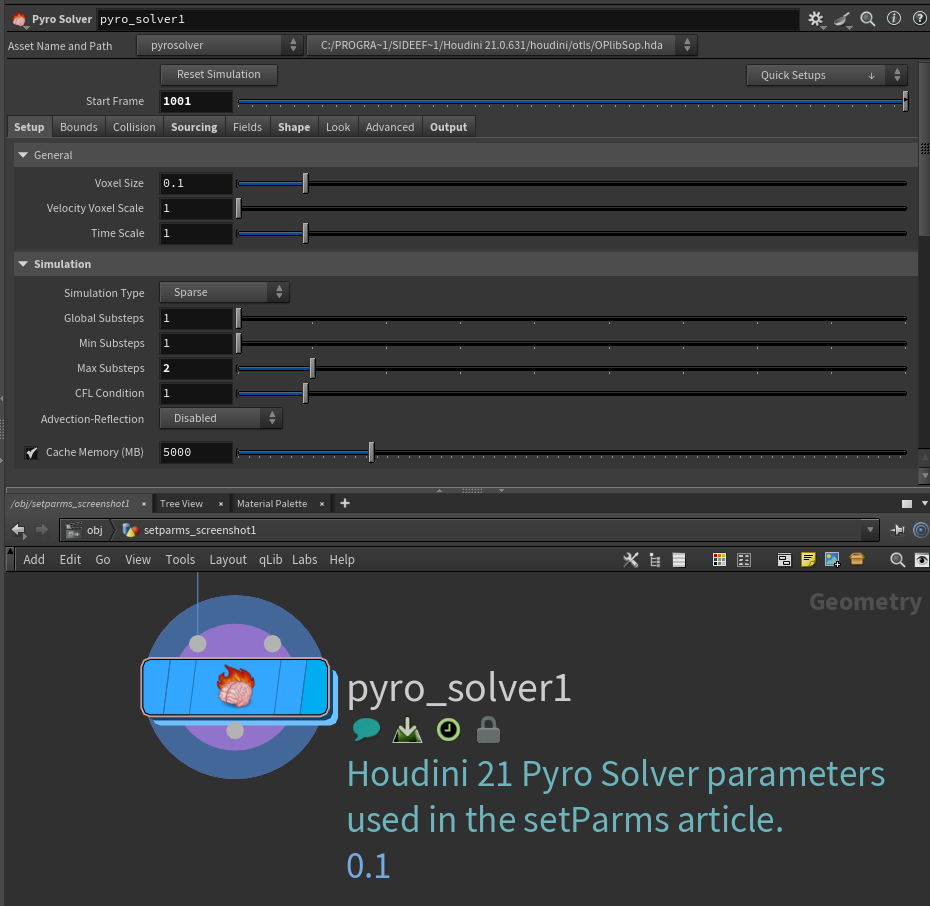
The Houdini 21 Pyro Solver SOP using the values from this example: Start Frame 1001, Time Scale 1, and Max Substeps 2.
Because the settings are data rather than a sequence of calls, I can merge overrides, print the final state for debugging, or save it elsewhere.
    base_settings = {
    "substeps": 2,
    "timescale": 1.0,
}

shot_overrides = {
    "substeps": 4,
}

final_settings = {**base_settings, **shot_overrides}
simulation_node.setParms(final_settings)
The override is visible instead of being hidden several lines later in the function.
Validate parameter names before setting them#
setParms() raises hou.OperationFailed when a key is not a valid parameter or parameter tuple. That catches the mistake, but in a production tool I still want the error to name the missing fields and the node that received them.
One important detail: setParms() is not atomic. If an invalid key appears after valid keys in the dictionary, Houdini can apply the earlier values before raising the exception. Validate the complete dictionary first whenever a partial update would be unsafe.
I usually validate the dictionary first:
    from typing import Mapping

import hou


def set_existing_parameters(node: hou.OpNode, values: Mapping[str, object]) -> None:
    """Set parameter values after checking that every name exists.

    Args:
        node: Houdini node to configure.
        values: Mapping of parameter or parameter-tuple names to values.

    Raises:
        ValueError: If one or more parameter names do not exist on the node.
    """
    missing_names = sorted(
        name
        for name in values
        if node.parm(name) is None and node.parmTuple(name) is None
    )

    if missing_names:
        missing_text = ", ".join(missing_names)
        raise ValueError(f"Missing parameters on {node.path()}: {missing_text}")

    node.setParms(dict(values))
Usage stays simple:
    values = {
    "t": (0.0, 1.0, 0.0),
    "ry": 45.0,
}

set_existing_parameters(node, values)
This has saved time when a node interface changed between Houdini versions, and when a callback was handed the wrong node type. For example, the settings above are real parameter names on Houdini 21's Pyro Solver SOP: Start Frame, Max Substeps, and Time Scale.
Be deliberate with animated parameters#
My original note came from a Pyro Solver setup script that did this before calling setParms():
pyro_solver.parm("startframe").deleteAllKeyframes()
That line is easy to overlook. Setting a value is not the same as saying, "This parameter should no longer be animated." On an animated parameter, setParms() keeps the channel and adds or updates a key at the current frame.
If the tool is supposed to replace animation with a static value, remove the keyframes explicitly first.
    start_frame = pyro_solver.parm("startframe")

if start_frame is None:
    raise hou.NodeError(f"{pyro_solver.path()} has no startframe parameter")

start_frame.deleteAllKeyframes()
pyro_solver.setParms({"startframe": int(hou.playbar.frameRange()[0])})
deleteAllKeyframes() leaves the parameter at the value it evaluates to on the current frame. After that, setParms() applies a static value rather than modifying an animated channel.
For a tuple, use parmTuple() and clear the complete tuple:
    translate = node.parmTuple("t")

if translate is None:
    raise hou.NodeError(f"{node.path()} has no translate tuple")

translate.deleteAllKeyframes()
node.setParms({"t": (0.0, 0.0, 0.0)})
Do not clear animation as a generic safety step. A pipeline utility should only remove keyframes when that is part of its stated behavior.
setParms() is for values, not expressions#
For parameter expressions, use setParmExpressions() instead.
    node.setParmExpressions({
    "tx": 'ch("ty")',
    "sy": "sin($F)",
})
Keeping values and expressions in separate dictionaries makes the intent clearer.
    static_values = {
    "tz": 2.0,
}

expressions = {
    "tx": 'ch("ty")',
}

node.setParms(static_values)
node.setParmExpressions(expressions)
A small helper for tool code#
This is the version I would actually keep in a shared Houdini utility module:
    from typing import Mapping, Sequence

import hou


def configure_node(
    node: hou.OpNode, values: Mapping[str, object], clear_animation: Sequence[str] = ()
) -> None:
    """Apply a validated parameter preset to a Houdini node.

    Args:
        node: Houdini node to configure.
        values: Static parameter or parameter-tuple values.
        clear_animation: Names whose keyframes should be removed first.

    Raises:
        ValueError: If a requested parameter name does not exist.
    """
    requested_names = set(values) | set(clear_animation)
    missing_names = sorted(
        name
        for name in requested_names
        if node.parm(name) is None and node.parmTuple(name) is None
    )

    if missing_names:
        missing_text = ", ".join(missing_names)
        raise ValueError(f"Missing parameters on {node.path()}: {missing_text}")

    for name in clear_animation:
        parm_tuple = node.parmTuple(name)
        if parm_tuple is not None:
            parm_tuple.deleteAllKeyframes()
            continue

        parm = node.parm(name)
        if parm is not None:
            parm.deleteAllKeyframes()

    node.setParms(dict(values))
Example:
    values = {
    "t": (0.0, 1.0, 0.0),
    "ry": 45.0,
}

configure_node(node, values, clear_animation=("t", "ry"))
I keep this helper deliberately boring. It does not swallow Houdini exceptions, skip unknown names, or guess whether animation should be removed. The calling tool should make those decisions explicitly.
When I would not use it#
I still use individual parm().set() calls when:
- I need different error handling for each parameter.
- Later values depend on evaluating earlier changes.
- I am setting ramp data or other values that need special preparation.
- The code is only changing one or two parameters.
- I need to preserve or deliberately manage channel references.
For ordinary node presets and setup scripts, a dictionary passed to setParms() is usually the clearest picture of the state I want the node to end up in.
WIP checklist#
- Double check everything.
- Add a Pyro Solver preset example with current parameter names.
- Confirm and document the behavior when one dictionary key is invalid.
- Add a Pyro Solver screenshot showing the UI labels and configured values.